Barracuda Script: A Modern Calligraphy Font for Elegant Design
Finding a typeface that feels both personal and polished can be a challenge. You want something that conveys warmth and artistry without sacrificing clarity or professionalism. This is where Barracuda Script enters the conversation. It’s a modern handwritten calligraphy typeface designed to bridge that exact gap, offering an elegant, flowing aesthetic that remains surprisingly versatile across a wide range of applications.
The Visual Personality of Barracuda Script
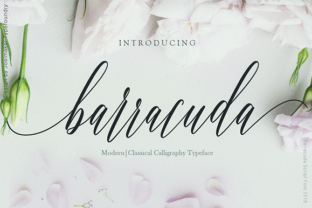
At its core, Barracuda Script is defined by its smooth, connected letterforms and a graceful baseline. Unlike rigid or overly ornate scripts, it strikes a balance. The strokes have a natural, organic flow, mimicking the subtle pressure variations of a real pen or brush. This gives it a human touch that feels authentic, not digitized or robotic. The overall feel is decidedly feminine and sophisticated, making it a go-to choice for projects aiming for a soft yet confident impression.
Its character set often includes a wealth of stylistic alternates and ligatures. These aren't just decorative extras; they are essential tools for customizing the font’s look. Swashes can be added to initial and final letters for a more dramatic flourish, while alternate lowercase characters can help avoid repetitive shapes, making long words or phrases look more like genuine handwriting. This level of detail is a hallmark of a quality premium font, allowing designers to tailor the typography to the specific needs of a logo or headline.
Where This Creative Font Shines: Real-World Applications
The true test of any typeface is how it performs in the wild. Barracuda Script excels in contexts where a personal, elevated tone is desired. It’s a natural fit for brand identity work, particularly for businesses that want to project approachability and elegance. Think of a boutique wedding planner, a high-end florist, a skincare brand, or a personal lifestyle coach. Using this font in a logo design immediately communicates care, attention to detail, and a personal connection with the client.
Beyond logos, its applications are extensive:
- Editorial & Publishing: Use it for chapter titles, pull quotes, or magazine headers to add a touch of editorial flair. It pairs beautifully with clean serif fonts or simple sans serif fonts for body text.
- Marketing & Social Media: In the fast-scrolling world of social media, a distinctive script font can stop the eye. It’s perfect for Instagram quotes, promotional graphics, and email newsletter headers. It adds personality to social media graphics without looking messy.
- Packaging & Product Design: For artisanal goods, cosmetics, or gourmet foods, Barracuda Script on packaging suggests craftsmanship and quality. It helps a product stand out on a shelf crowded with generic, utilitarian fonts.
- Invitations & Stationery: This is its classic domain. Wedding invitations, event programs, thank-you cards, and stationery sets all benefit from its elegant, celebratory feel.
- Digital Presence: While primarily a display font, it can be used strategically on websites for hero sections, key headings, or call-to-action phrases to inject brand personality into web design.
Practical Guidance for Choosing and Using Barracuda Script
Choosing a creative font like this requires more than just liking how it looks in a preview. Here’s how to evaluate if it’s the right fit for your project.
1. Test for Context and Readability. First, consider your audience and medium. A flowing script is beautiful, but its readability can decrease at small sizes or on low-resolution screens. Always test it at the intended scale. For a website headline, ensure the characters are distinct enough when viewed on a mobile device. For print, check how it renders on your chosen paper stock. A font that’s perfect for a large-format poster might be illegible on a business card.
2. Master the Art of Font Pairing. Barracuda Script is a star player, but it needs a strong supporting cast. It rarely works well for long paragraphs. The key is to pair it with a highly legible neutral font. A classic combination is with a simple sans serif font like Montserrat or Lato for body text. For a more traditional or luxurious feel, pair it with an elegant serif font like Playfair Display or Lora. The contrast creates a clear visual hierarchy, guiding the reader’s eye from the expressive headline to the informative body copy.
3. Explore Its Stylistic Sets. Don’t just install and type. Dive into the font’s OpenType features. In software like Adobe Illustrator or Photoshop, you can access alternates and swashes. Experimenting with these can transform a standard word into a custom logotype. For instance, substituting a lowercase ‘e’ or ‘h’ with an alternate can change the entire rhythm of a word, making your brand identity truly unique.
4. Understand Licensing for Commercial Use. If you’re using this font for client work, products for sale, or business branding, you need to ensure you have the correct commercial font license. Most premium fonts come with a license that covers personal and commercial use, but it’s crucial to read the terms. Check the number of allowed users (seats) and whether the license covers specific uses like e-books, apps, or merchandise. Using a font without proper licensing can lead to legal issues down the line.
Ultimately, Barracuda Script is more than just another handwritten font. It’s a versatile design asset that, when used thoughtfully, can elevate a project from ordinary to memorable. Its strength lies in its ability to add a human, elegant touch to modern typography, making it a valuable tool for designers, entrepreneurs, and creators aiming to build a distinctive and engaging visual language.